AI can help you write an article quickly. It cannot decide whether that article deserves to be published. For a new blog, the critical skill is turning an AI-assisted draft into something readers can actually use: a checked answer, a worked example, a clear visual, and a practical next action.
This is an end-to-end editorial tutorial, not another general plan for launching a website. We will take one sample article from reader question to final quality review, show the exact prompts, and identify the decisions you must make yourself.
The sample assignment: make one article genuinely helpful
Imagine your blog helps busy office workers use AI in everyday tasks. Your candidate article is “How to Prepare a Weekly Status Update with AI Without Inventing Progress.” A reader wants a repeatable method that keeps unfinished work clearly unfinished. The useful result is not a polished essay about AI; it is a reliable process, a prompt, a sample output, and a review checklist.
Step 1: Write an answer-first editorial brief
Before generating a draft, define the exact question and the minimum evidence needed to answer it. Write the answer in one sentence: “Give AI a verified list of completed tasks, open tasks, and blockers; ask it to format a status update without changing their status; then review every claim.”
- Reader: A person who sends a weekly work update.
- Reader outcome: A status email that distinguishes done, in progress, blocked, and next.
- Verified material: The person’s own task notes and agreed deadlines.
- Risks: AI inventing achievements, owners, percentages, or delivery dates.
- Useful extra: A reusable prompt, before-and-after example, and final check.
Step 2: Ask AI for research gaps before it writes
You are an editorial assistant, not an eyewitness.
Article question: [the reader's exact question]
Audience: [specific reader]
What I know firsthand: [notes or 'none']
Verified facts and sources: [notes/links]

Before drafting, return:
1. The direct answer in 2 sentences.
2. What a reader must know before starting.
3. Claims that need independent verification.
4. A useful worked example I can create honestly.
5. Safety, privacy, or workplace-policy considerations.
6. Questions I need to answer.
Do not invent citations, tool tests, personal experience,
or performance statistics.
If the assistant says a particular AI feature exists, check that against the provider’s own documentation. If a claim cannot be verified, remove it or state the uncertainty rather than presenting a guess as fact.
Step 3: Build the article around a realistic worked example
Here is a fictional training example, not a claim about a real workplace. The input notes are: “Customer FAQ draft finished Monday. Two charts still being reviewed. Awaiting approval for Thursday’s presentation. Next: revise charts and share slides.”
A dangerous AI output would say, “The team completed the full presentation, finalized both charts, and is ready to present.” That changes three facts. A stronger sample update preserves the statuses:
Completed: Customer FAQ draft finished Monday.
In progress: Two charts are under review.
Blocked / waiting: Thursday presentation is pending approval.
Next actions: Revise the charts after feedback and share the slides when approved.
The value of the example is its fidelity to the original notes. It demonstrates an important editing rule: never let fluent writing quietly promote an unfinished task to a completed one.
Step 4: Use a drafting prompt that protects facts
Write a reader-first tutorial using the editorial brief below.
[Paste verified brief]

Structure:
- Answer the question in the opening 60 words.
- List prerequisites and safe-use boundaries.
- Explain the process in numbered steps.
- Include the clearly labeled hypothetical example.
- Provide the exact reusable prompt in a copyable block.
- Include mistakes and a human-verification checklist.
- End with one small action the reader can take today.

Rules:
- Preserve all statuses, dates, names and qualifiers.
- Use [VERIFY] when evidence is missing.
- Never invent source URLs or personal experience.
- Cut repetition; do not pad for word count.
Step 5: Make the illustration teach, not just decorate
A strong AI-help article typically benefits from three complementary visuals: a thumbnail with a clear topic, a process explanation, and a specific worked example or checklist. The headline must remain readable when the image becomes a small card. The two body visuals should add information not already obvious from the surrounding paragraph.
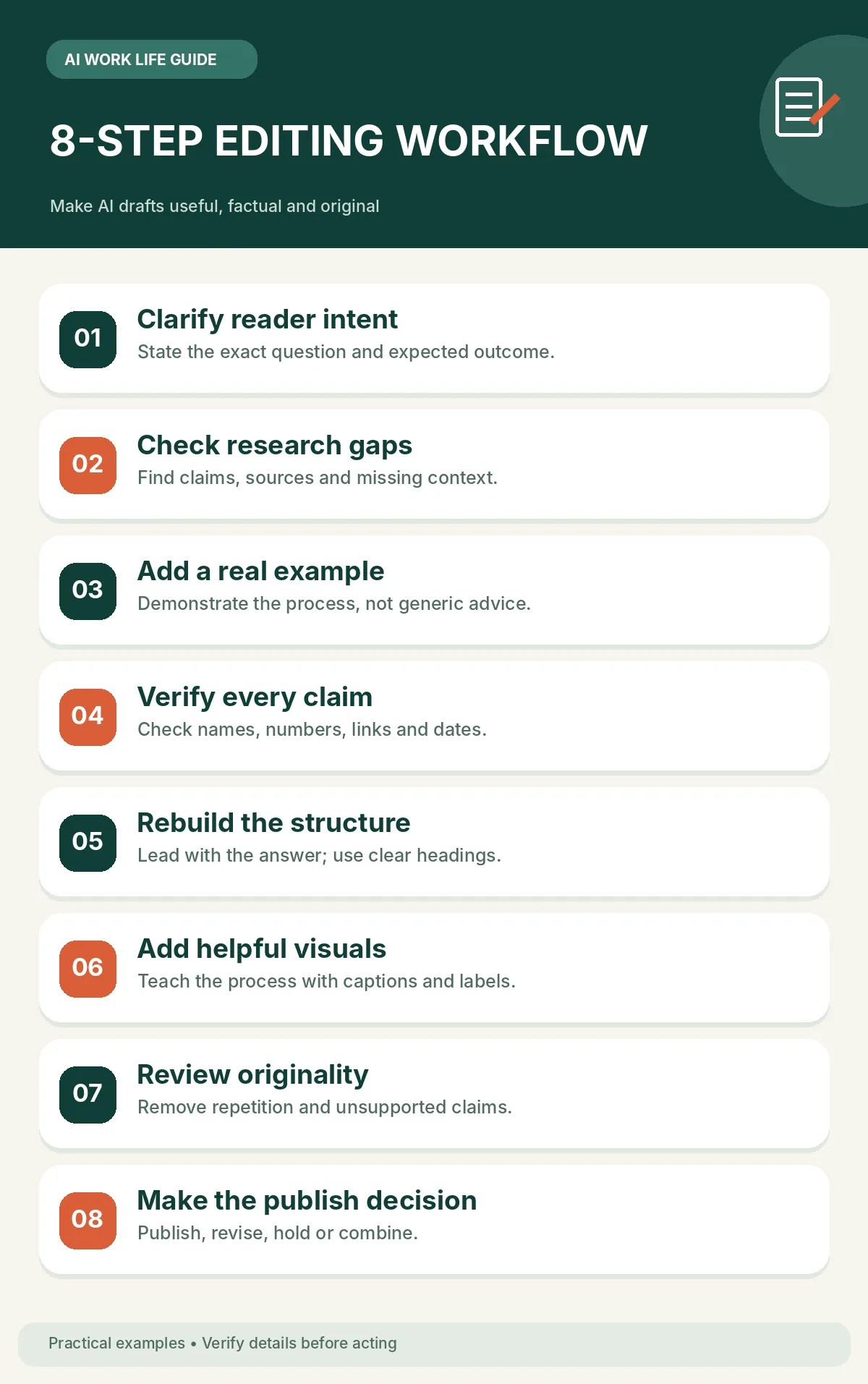
These illustrations show how an editorial workflow can be organized. For your own tutorial, prefer images that match its actual subject—such as a clearly labeled status-update flow or an annotated screenshot with sensitive information removed.
Step 6: Compare your first draft against a publish-ready standard
| Check | Weak draft | Publish-ready improvement |
|---|---|---|
| Specificity | “AI saves time.” | Explain exactly what input, output, and review steps the reader should use. |
| Evidence | Unattributed statistics | Link a credible original source, identify limitations, or remove the claim. |
| Experience | Invented first-person story | Add a real test or explicitly label a hypothetical example. |
| Images | Decorative stock-style image | Use a labeled workflow diagram or real, permissioned demonstration. |
| Reader action | “Try AI today.” | Provide a concrete template and a one-minute starting task. |
Run a second review in which the AI is explicitly encouraged to find faults rather than compliment the writing.
Audit this article for publication. Act as a skeptical editor.
[Paste the complete draft]

Create a table with:
- Exact problematic sentence
- Problem type (accuracy, usefulness, privacy, clarity,
  duplication, accessibility, or unsupported experience)
- Proposed correction
- Whether a human must verify it

Check all names, dates, numbers, quotes, links, headings,
image labels, and factual implications.
Do NOT call this article ready just because it reads smoothly.
Finally, list the five most important fixes.
Step 7: Check whether the article is different enough to publish
Search your own blog before posting. If an existing article already explains the same problem to the same reader, improve it instead of making a near-duplicate. For a genuinely new article, link to relevant older guides only when the reader would naturally benefit from them.
For example, someone refining a status-update article may also need our guide to turning scattered project notes into an action plan or our guide to drafting clearer work emails. Both connections serve the task rather than merely adding links.
Step 8: Use a repeatable publish-or-revise decision
- Publish: The primary question is answered, claims are checked, and the example is useful.
- Revise: The answer is sound but lacks a clear demonstration, accessible images, or a practical next step.
- Hold: Core claims are unsupported or the article implies experiences or results that never happened.
- Merge: The piece repeats another article without a distinct reader problem.
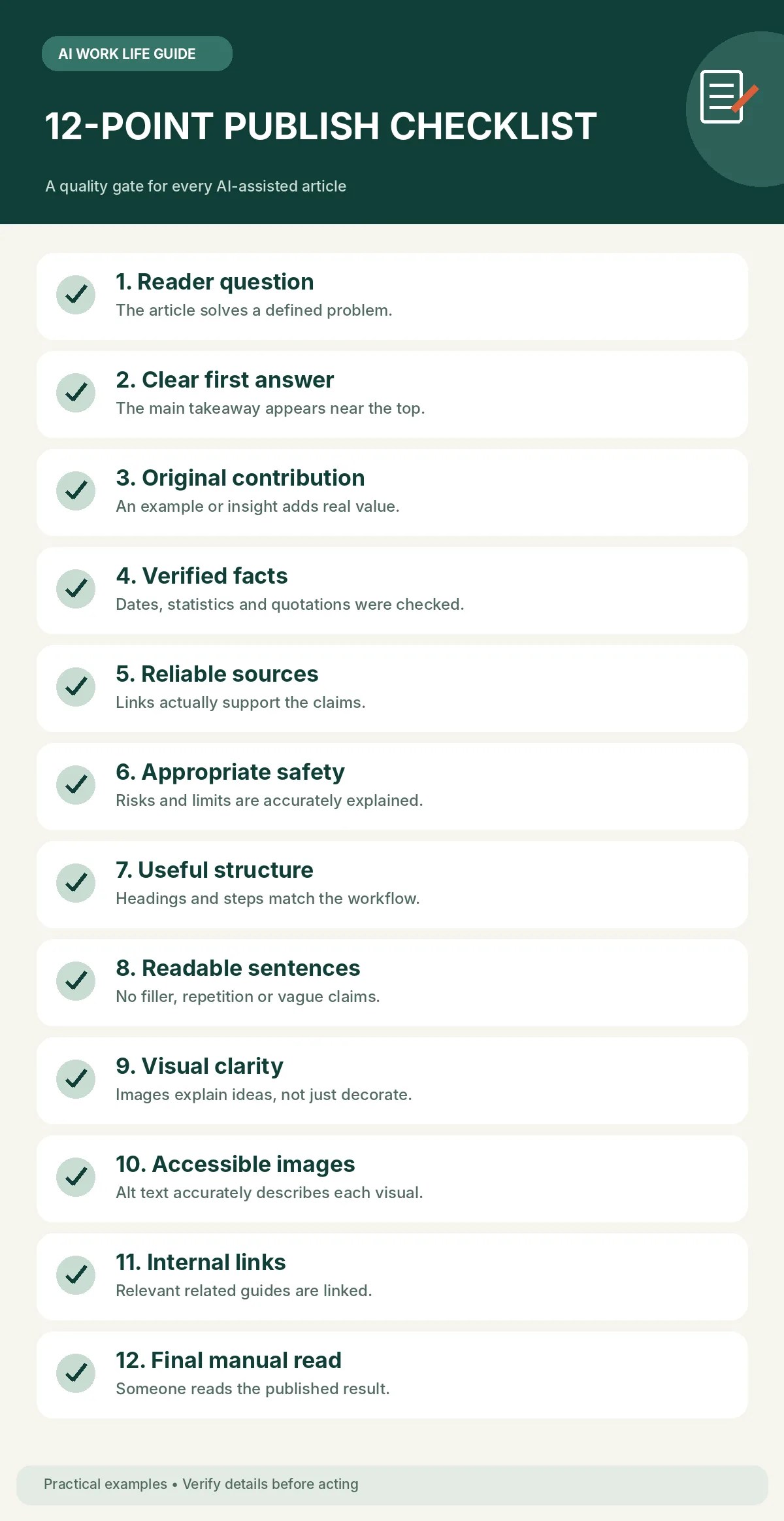
A 12-point pre-publication checklist
- Headline describes the actual reader problem, without an exaggerated promise.
- The first paragraph provides a useful answer.
- Any firsthand claims reflect real experience; simulations are labeled.
- Each substantive factual claim has an appropriate reliable basis.
- All numerical examples and calculations have been checked.
- No confidential details or identifying customer information were pasted into unapproved tools.
- Every instruction is feasible and its limitations are explained.
- The article adds value beyond a paraphrase of search results.
- Images match the specific article and include meaningful alternative text.
- Heading structure, links, tables, and mobile readability are checked.
- Internal links lead to relevant, working pages.
- The article contains a clear next action that a reader can complete.
What Google guidance actually says
Google Search Central advises creating helpful, reliable, people-first content and using generative AI responsibly; producing many pages without adding value can raise spam concerns. Quality, usefulness, and policies matter more than presenting AI as a shortcut to rankings. AdSense eligibility is separate, and no checklist guarantees approval.
Official references: Creating helpful, reliable, people-first content; Using generative AI content; AdSense program policies.
Frequently asked questions
Is a long AI-written post necessarily better?
No. Depth is useful when it answers genuine reader questions, but length is not a substitute for accuracy, demonstration, or original value.
Can I ask AI to create examples?
Yes, if you clearly label hypothetical or simulated examples and do not present them as real tests, client outcomes, or personal experience.
Should I publish an AI draft immediately?
Only after editorial review. AI-generated wording can be convincing even when its claims, links, or implications are wrong.
Do I need expensive tools for this workflow?
Not necessarily. The core workflow is an editorial process: useful notes, careful prompting, fact checking, illustrative material, and human judgment. Tool access and pricing vary.
Your next practical action
Open one unpublished draft and apply the 12-point checklist. Identify the single claim most likely to mislead a reader and verify or remove it. Then add one small example or visual that demonstrates the answer. Those two improvements often matter more than generating another generic article.
Editorial note: All workplace scenarios in this guide are hypothetical examples. Images are illustrative, not screenshots of a verified software workflow or evidence of results.
Leave a comment