
MAKE A BILL CALENDAR
Due dates · Cash timing · Safe reminders
Everyday AI for U.S. households · Privacy-first worksheet — Examples and dates are fictional and do not represent a tested financial product or personal recommendation.
A monthly bill calendar answers a question many people ask only when a payment is almost due: What must be paid, when, and which income deposit needs to cover it? An AI assistant can help organize a simple list into a readable table. It cannot see your actual account balance, predict when a bank will post a transaction, verify your provider’s payment rules, or make bill payments unless a separate authorized system has that ability.
The Consumer Financial Protection Bureau (CFPB) bill-calendar guide recommends gathering bills, recording amounts and due dates, keeping the calendar accessible, and reviewing it regularly. We turn that real-world method into a privacy-safe AI-assisted worksheet with clear human checks.
Jump to: Gather bills · Sample calendar · Copy prompt · Weekly routine · Autopay safety · Four-step graphic · Checklist.
1. Gather original bill details without sending private records to AI
Start with a provider’s billing portal or the statement you are authorized to access. Before scheduling a payment, distinguish an estimated bill from a final posted amount. Utility bills may vary, annual insurance premiums might be charged only once or twice a year, and subscription renewal dates can change with plan terms.
- Bill label: use an anonymous category like RENT, INTERNET, POWER, INSURANCE, or PHONE, not an account number or full legal name.
- Amount: record the amount from the current provider statement and whether it is fixed, variable, estimated, or already paid.
- Due date: read the original bill’s date, its time zone or cutoff when applicable, and any processing window.
- Payment method: note ‘manual,’ ‘bank bill pay,’ or ‘merchant automatic debit’ without writing bank credentials in the worksheet.
- Income date: note expected pay dates separately. A scheduled deposit is not the same as an available balance.
- Pending items: list unissued variable bills or unknown dates as [VERIFY WITH PROVIDER] instead of inventing them.
Avoid uploading actual bill scans, bank statements, debit card numbers, account numbers, passwords, security answers, payroll details, or private names to an unapproved chatbot. For a safe alternative, use our AI Prompt Privacy Checklist and replace identifying information with generic labels.

BUILD A CLEAN BILL LIST
Amount · Due date · Payment status
AI-generated illustrative desk scene. The paperwork and amounts are not real household or bank records.
2. Worked example: a fictional household bill calendar
Imagine an American household that expects income of $1,750 on the 1st and $1,600 on the 15th, for $3,350 in the example month. The household has the following sample bills. The payment calendar is not a full budget; food, transportation, emergencies, taxes, debt spending, and other essential costs are not included.
| Bill (fictional) | Amount | Due date | Source check |
|---|---|---|---|
| Rent | $1,100 | 3rd | Lease or landlord portal |
| Internet | $65 | 9th | Current provider bill |
| Electricity | $115 | 17th | Actual monthly statement |
| Car insurance | $140 | 21st | Insurer statement |
| Phone | $60 | 27th | Current provider bill |
| Total example bills | $1,480 | — | Verify each entry |
Illustrative arithmetic: $1,100 + $65 + $115 + $140 + $60 = $1,480. Income $1,750 + $1,600 = $3,350. The difference, $1,870, is not savings or money available to spend because food, transport, other obligations, taxes (if the pay amounts are not net), and unexpected costs have not been counted.
Timing matters. Rent plus internet totals $1,165 before the second illustrative paycheck, but that comparison by itself does not prove the money is available. The opening balance, pending card charges, payroll delays, weekends, and other bills may change what can actually be paid. Do not let an AI assistant mark a bill ‘covered’ without the real available balance and a human check.
3. Copy a privacy-safe prompt to organize a bill calendar
The following prompt is designed for fictional or anonymized inputs only. It asks AI to mark uncertainty instead of guessing. Keep your bank and provider logins outside the prompt.
You are a bill-calendar ORGANIZER, not a payment service.
I will give fictional or privacy-minimized household bill data.

PAYDAY LABELS: [e.g., 1st and 15th — estimated only]
BILLS:
[RENT] amount [$], due [day], status [confirmed/estimated]
[INTERNET] amount [$], due [day], status [...]
[UTILITY] amount [$], due [day], status [...]
[OTHER] ...

Please create:
1. A simple chronological table: Bill | Amount | Due |
   Payment mode | Verify with provider | Paid? [BLANK].
2. A separate row for expected income dates.
3. The sum of ONLY confirmed example bill amounts.
4. Flags for unknown dates, variable amounts, and
   payment processing or weekend/holiday questions.
5. A weekly check list that does not assume a bill is paid.

Use [VERIFY] when information is missing.
Never invent account balances, payment confirmations,
paycheck deposits, discounts, grace periods, or fees.
Do not request account numbers, logins, IDs, or bank details.
Do not schedule or claim to make payments.
After AI returns the list, compare every amount and date to the original. If it substitutes last month’s electricity amount for the new statement, or automatically marks an item paid because its due date passed, correct the worksheet. A date is not proof of payment.
4. A ten-minute weekly review that actually works
- Minute 1–2: open your local calendar and the official provider or banking records you already use; do not share credentials.
- Minute 3–4: review bills due in the next 7–10 days and note dates that fall on weekends or holidays.
- Minute 5–6: confirm pending automatic withdrawals and manual payments; do not count a scheduled debit as settled.
- Minute 7–8: check which expected deposits have actually posted and whether other expenses leave enough money.
- Minute 9–10: record paid status from genuine payment confirmations, and set your own reminder for anything unclear.
If cash timing looks tight, contact the company through an independently verified customer service channel to ask about documented payment arrangements. AI may help draft a polite question, but it does not guarantee a due-date change, a waiver, or a payment plan. If the bill is disputed, follow the relevant provider and legal process rather than accepting chatbot advice as an authoritative ruling.
5. Understand automatic debit before relying on it
The CFPB explains that automatic debit from an account and bank bill-pay are different arrangements: the company pulls funds in the first; the bank sends a payment in the second. Read the real authorization terms and confirm the payment date and variable amount rules.
Autopay can reduce missed payments, but it is not automatically free of problems. A payment may occur when funds are insufficient; the CFPB warns about overdraft and insufficient-funds charges. Always distinguish an upcoming authorized debit from a settled transaction. Reviewing your own balance and provider records matters even if AI created the calendar.
If you need to withdraw authorization for automatic debits, see the CFPB guidance on stopping automatic payments. Stopping a debit does not necessarily cancel the underlying service or debt, and procedures, deadlines, and protections depend on the circumstances. Use actual provider and bank instructions.
6. The four-step bill-calendar workflow at a glance
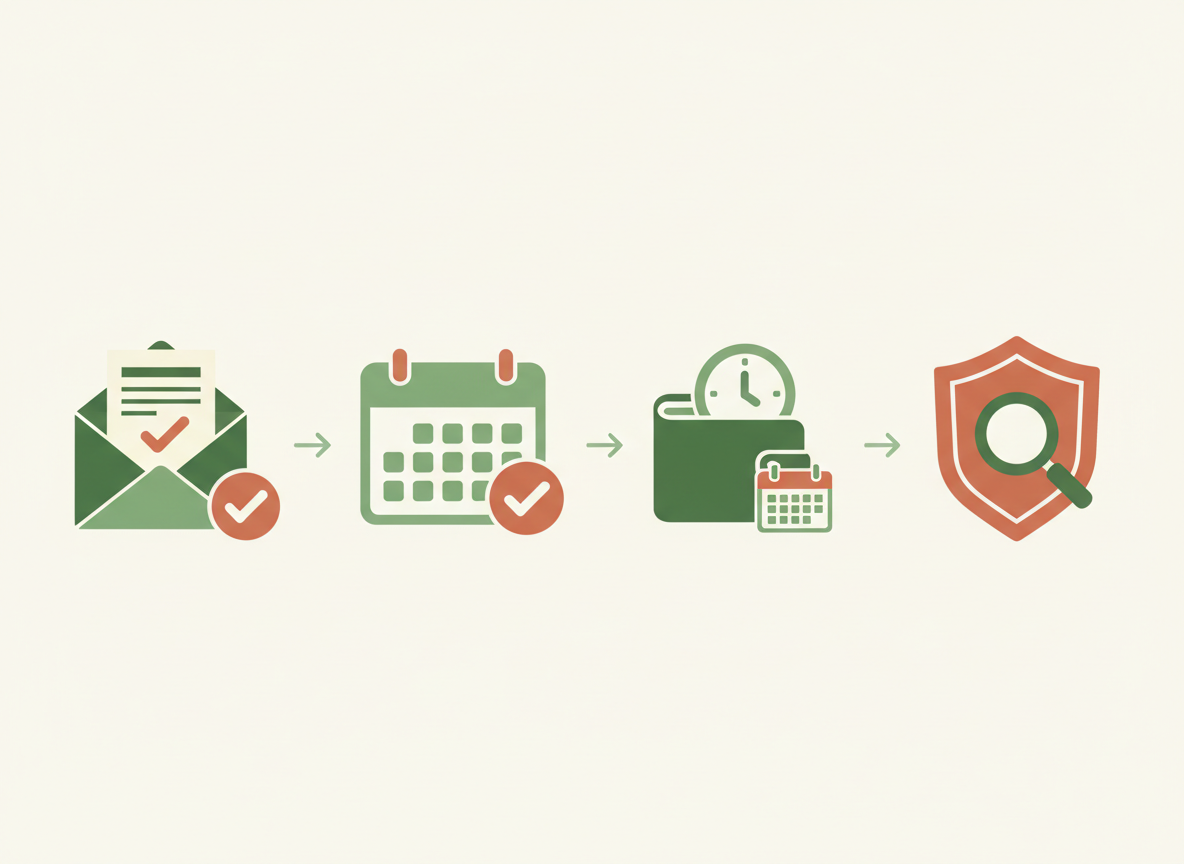
FOUR BILL CHECKS
Statement → Date → Timing → Verify
AI-generated infographic illustrating the workflow. It is not a financial institution’s official document.
- Statement: collect official source information for each current charge. Never substitute an invented AI amount.
- Date: place the current bill’s due date and the separate planned payment date on a local calendar.
- Timing: check expected income dates and actual available funds independently; be aware of processing times.
- Verify: only label paid after the payment posts or is supported by a real provider confirmation.
The CFPB’s Your Money, Your Goals toolkit contains a downloadable bill calendar and other practical tracking resources. The government worksheet provides a useful non-AI starting point if you prefer to work entirely offline.
7. Handle variable bills and recurring charges separately
A calendar should surface—not conceal—uncertainty. For electricity or water, enter the amount only after the actual bill arrives; if planning ahead, clearly mark a placeholder estimate and replace it with the real statement. For annual insurance renewals, note the renewal date and ask about the actual bill and payment method. For subscriptions, distinguish the renewal date from the service cancellation deadline.
- Variable utilities: make room for a different amount each month, and check the actual bill for the due date.
- Credit cards: distinguish statement balance, minimum payment and total balance, and review the issuer’s actual terms; a generated debt strategy is not personalized advice.
- Shared household bills: confirm who pays, who checks receipts, and where confidential records are stored.
- Annual or quarterly payments: add a separate reminder well before the renewal, without claiming a fee or charge is due until verified.
- Cancelled subscriptions: keep cancellation evidence; turning off automatic withdrawal does not always terminate an agreement.
For extra help reading subscription contracts, see our AI subscription cost and renewal comparison guide.
8. Final bill-calendar checklist
- All labels are generic and no account numbers, passwords or banking credentials were entered into AI.
- Amounts and due dates were copied from genuine, current provider records.
- Variable or unissued charges remain explicitly [ESTIMATE] or [VERIFY].
- Income dates are separated from confirmed available balances.
- Automatic debit, bank bill-pay, and manual payments are labeled correctly.
- Time-sensitive payments have appropriate reminders based on verified processing terms.
- The example table does not claim to predict savings or account sufficiency.
- Only actual paid transactions or real confirmations are marked completed.
- The household has an offline or protected copy and a regular review plan.
- All important decisions and changes were verified with the provider, bank, or a qualified professional.
Official sources and limitations
- CFPB — Know What You Owe and When It Is Due: practical bill-calendar steps.
- CFPB — Your Money, Your Goals: bill-calendar and spending tools.
- CFPB — How Automatic Payments Work: debit authorization and account risks.
- CFPB — Stop Automatic Payments: understanding bank and company procedures.
Editorial review: October 11, 2026. Figures, dates, photographs and the household example are instructional fiction, not actual financial records. CFPB material is general consumer guidance. The calendar is not a banking connection, financial advisory service, legal opinion, or a tool that sends payments. Real payment availability and applicable rights require verification from relevant providers.
Explore next: Check subscriptions and renewals · Verify details from a PDF · Protect personal information in AI prompts · Check every important AI answer.
Leave a Reply