
A meeting can produce plenty of notes but no clear next step. An AI assistant can organize permitted notes into a short summary, a decision log, and an action tracker—but it can also turn a suggestion into a supposed decision or assign a deadline nobody agreed to. The safest workflow keeps the original notes in view and asks a person to confirm anything that changes someone’s responsibilities.
This guide is for everyday U.S. workplace and volunteer-team meetings. It offers a copy-ready prompt, a fictional worked example, a verification table, a follow-up message, and a 20-minute review routine. It does not assume your workplace permits recording, transcription, or uploading meeting material to an external AI service.
Before taking AI notes: check permission and privacy
Start with permission, not a record button. Ask whether the meeting host, participants, and your organization allow recording or transcription, and follow any applicable notice, consent, confidentiality, and retention requirements. Rules depend on your location, employer, and the meeting context. This article is general education, not a determination that recording is lawful in your situation.
Microsoft’s official Teams documentation explains that recording can automatically notify participants and that organizations can configure who is allowed to record or transcribe. Some policies can require participant agreement. A notification banner is a product behavior, not a substitute for checking your own permission and legal requirements. See the Teams recording guide and Teams recording and transcription controls.
- No recording permission? Use ordinary notes that you are authorized to take. Do not secretly capture audio just to feed an AI tool.
- Sensitive meeting? Ask your organization whether an approved AI workspace may process the notes. If uncertain, keep the material within permitted systems.
- External attendees? Confirm the expected record-sharing audience before uploading or circulating any transcript.
- Personal or confidential details? Minimize them in notes and prompts. Names, client information, salaries, and health data may need stricter handling.
Step 1: capture a small, reliable source record
During the meeting, record five things: the date, purpose, verified participants if relevant, exact decisions, and next actions being discussed. You do not need a word-for-word transcript to create useful minutes. When someone proposes an action but the team has not accepted it, write it under proposals, not decisions.
Meeting title: [non-sensitive title]
Date / time zone: [verified]
Purpose: [one sentence]
Attendees relevant to the work: [only as permitted]

CONFIRMED DECISIONS
- [what was explicitly agreed, and by whom]

PROPOSALS OR IDEAS (NOT YET APPROVED)
- [idea and next confirmation needed]

POSSIBLE ACTIONS
- Task: [specific deliverable]
- Owner: [named only if explicitly assigned]
- Due date: [date only if explicitly confirmed]
- Evidence: [note line, agenda item, or approved source]

OPEN QUESTIONS
-
Keep the raw notes available for verification. If using an approved transcript, watch for missing speakers, noisy audio, inaccurate names, and omitted material. Notes or transcripts should not be described as complete or error-free without review.
Step 2: ask AI to sort facts, decisions, and unanswered questions
Provide only notes you are permitted to share. Ask the assistant to organize the facts, not create new commitments. Have it label missing details with a visible marker so you can resolve them afterward.
You are editing my permitted meeting notes into a draft
summary. Use ONLY the text I provide below.

Meeting purpose: [purpose]
Intended readers: [team or role]
Notes: [paste only authorized, non-sensitive notes]

Produce these sections:
1. Short purpose and factual discussion summary
2. CONFIRMED decisions supported by a note line
3. PROPOSED ideas that were not approved
4. Action register: action, owner, due date,
   evidence/source note, and status
5. Unresolved questions for the meeting organizer

Rules:
- If no one accepted a proposal, don't call it a decision.
- If an owner or date is missing, use NOT CONFIRMED.
- Don't invent attendees, votes, dates, prices,
  project progress, or direct quotations.
- Cite the corresponding note item for each key claim.
- Separate the original note from your interpretation.
- Don't send anything; this is a draft for human review.

A DRAFT IS NOT AN APPROVED DECISION
Illustration: Compare action items with the original discussion and explicitly mark anything not yet confirmed.
Step 3: test the output with a worked fictional meeting
Fictional teaching example: A community volunteer team is planning a Saturday welcome event. The meeting notes say: “Taylor can prepare a draft checklist. Morgan suggested printing 100 copies. The team agreed to use the community hall if the booking is confirmed. Taylor said the checklist draft could be ready by Thursday. Morgan hasn’t agreed to handle printing.” No real meeting was transcribed or analyzed for this example.
| Statement in notes | Safe summary | What still needs confirmation |
|---|---|---|
| Taylor can prepare a draft checklist | Proposed action: draft a checklist | Did Taylor accept the task? Is Thursday a committed deadline? |
| Morgan suggested printing 100 copies | Idea only: print 100 copies | Quantity, budget, and who will print are not approved |
| Use community hall if booking confirmed | Conditional decision: hall is preferred subject to booking | Who checks availability and when? |
| Morgan hasn’t agreed to handle printing | No printing owner confirmed | Ask the organizer to assign or postpone the work |
Incorrect AI output: “Morgan will print 100 copies by Friday, and the hall is booked.” Neither claim is supported. A useful correction says that printing ownership and the venue booking are unconfirmed. The distinction matters because publishing a polished but false action list can create real work and cost for other people.
Step 4: build a source-linked action register
Turn only confirmed obligations into the action tracker. Put proposed tasks in a separate waiting-for-confirmation column. Use a consistent source label such as “agenda item 3” or “meeting note 4”; if your notes don’t support a claim, do not attach a pretend citation.
| Item | Owner | Due | Status | Source |
|---|---|---|---|---|
| Draft welcome checklist | Not confirmed | Thursday proposed | Needs assignment | Note: Taylor proposed a draft |
| Print 100 copies | Not confirmed | Not confirmed | Idea only | Note: Morgan suggested quantity |
| Confirm hall booking | Not confirmed | Not confirmed | Requires decision | Note: hall use conditional |
A good action item names one specific result and an accountable person, with a realistic deadline only once confirmed. Where these details are missing, your summary should make the gap easy to notice. NIST’s Generative AI Risk Management Profile identifies confidently presented erroneous content as a risk; invented owners, decisions, or timestamps are examples worth checking.
Step 5: conduct a five-question human review
- Decision or discussion? Did participants really approve the decision, or merely suggest an option?
- Ownership: Did the person agree to the task, or did AI assign it by inference?
- Dates: Were deadlines confirmed, and do they match the correct time zone or calendar?
- Evidence: Can you find each material claim in the source notes or approved transcript?
- Sharing: Can everyone on the proposed recipient list legitimately access these details?
When different participants remember events differently, return to the relevant sources and ask the meeting organizer to clarify the record. Do not treat an AI-generated consensus as evidence of actual agreement.
Step 6: send a brief follow-up for confirmation
A useful meeting recap is short enough to act on but explicit about what remains open. A follow-up should invite corrections instead of presenting the draft as unquestionable minutes.
Subject: Draft recap — [meeting] — please confirm

Hi team,

Here is my draft summary from [date]. Please reply if
I misunderstood a decision or action.

Confirmed decisions:
- [decision explicitly agreed]
- [any conditions that still apply]

Actions needing owner/date confirmation:
- [task] — owner: not confirmed; due: not confirmed
- [task] — owner: not confirmed; due: not confirmed

Open questions:
-

If you can, please confirm or correct these details by
[review deadline agreed by the organizer].
I'll update the action tracker after the review.

Thanks,
[organizer or note taker]
Do not invent a review deadline in the email. Use one the organizer approves, and send the recap only through the communication channel approved for the meeting. The message itself can be drafted with AI, but the human note taker remains responsible for the accuracy and recipient list.
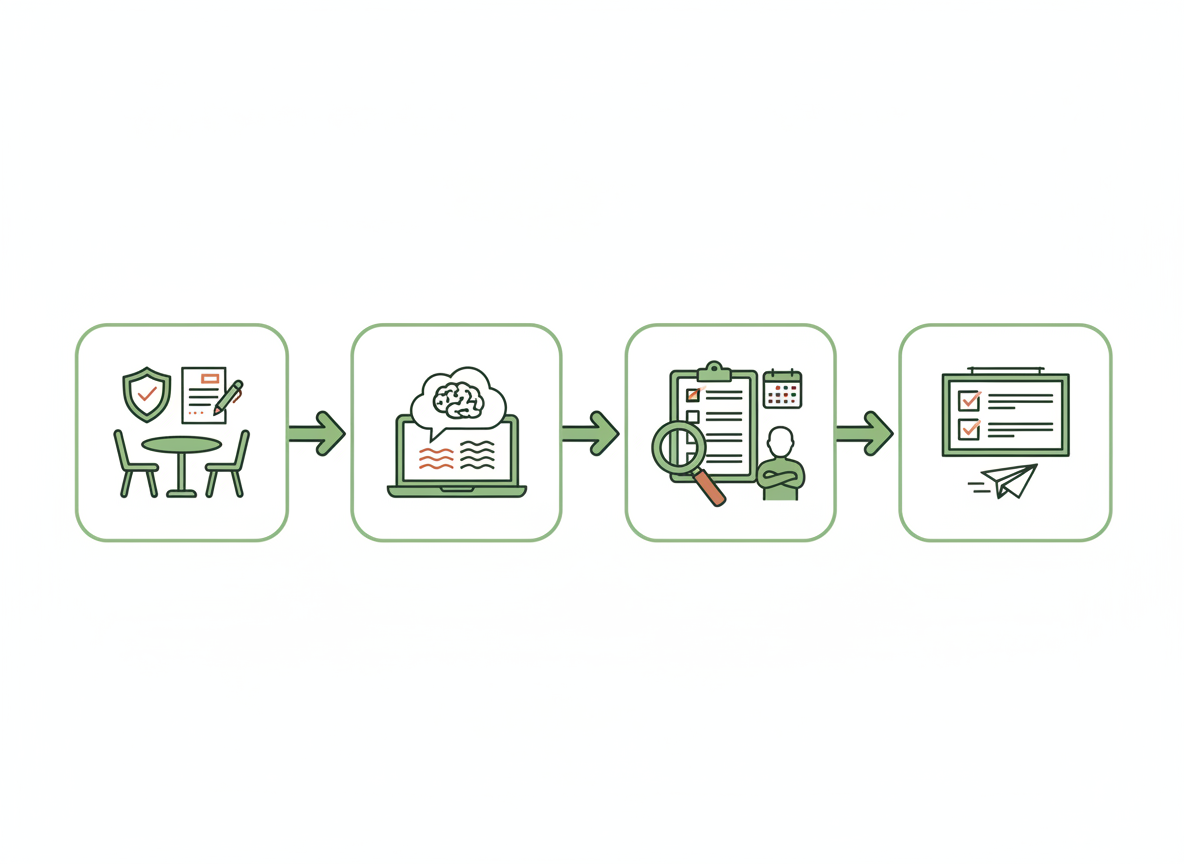
COLLECT → DRAFT → VERIFY → SHARE
Illustration: The final stage happens only after the meeting owner has checked uncertain details.
A realistic 20-minute meeting-notes workflow
| Time | Review task |
|---|---|
| 0–4 minutes | Organize authorized notes and remove details you must not upload. |
| 4–8 minutes | Generate a structured draft with decisions and proposals separated. |
| 8–14 minutes | Check owners, deadlines, decisions, exceptions, and relevant source lines. |
| 14–18 minutes | Write a short follow-up and mark all missing details for confirmation. |
| 18–20 minutes | Check the recipient list and save the draft in the approved workspace. |
This is an illustrative time budget, not a performance guarantee or a tested result. Longer meetings, confidential topics, inaccessible recordings, and unclear commitments require more human review. When notes are incomplete, the right result may be a short list of questions instead of a full action register.
Common mistakes to avoid
- Recording without checking authorization: Platform tools do not replace applicable law or organizational policy.
- Confusing ideas with commitments: A participant’s suggestion is not automatically an approved action.
- Inventing ownership: AI can make a plausible guess about who should do work; leave it unassigned until someone confirms.
- Guessing deadlines: A time estimate or tentative date is not necessarily a committed due date.
- Sharing broadly: A well-formatted recap can still contain information that the recipients should not receive.
- Deleting the wrong source: Follow approved retention rules for notes and recordings; do not erase official records just because the summary looks complete.
Frequently asked questions
Can I use AI to summarize a meeting without recording it?
Yes, when you are permitted to use the notes with the chosen AI service. You can draft from a brief manual outline or agenda. Check with your organization and avoid entering restricted information in an unauthorized tool.
Does a Teams recording notice mean I have legal permission?
No. A Teams notice is a product notification. Consent, recording rights, and confidentiality rules depend on jurisdiction, participants, the meeting, and workplace policy. Confirm the applicable requirements with your organization or qualified guidance.
Can AI decide who owns each task?
AI may suggest an appropriate role for a task, but it cannot turn that suggestion into a real team assignment. The responsible person or organizer should explicitly confirm the owner.
Should I share the complete transcript?
Only when doing so is authorized and appropriate. A short reviewed summary may be more useful for the intended team, while official records must be retained and accessed according to applicable policy. Confirm permissions and storage before distributing recordings or transcripts.
Official references and related guides
- Microsoft Support: Record meetings in Teams — meeting notification, recordings, and storage.
- Microsoft Learn: Recording and transcription controls — organizer/admin policies, participant agreement, and access.
- NIST: Generative AI Risk Management Profile — errors and risk management for AI outputs.
- Turn messy project notes into a clear action plan — use only verified assignments as input.
- Write a clear workplace follow-up email with AI — communicate reviewed meeting actions.
- Summarize a PDF with AI while checking source details — verify any attached approved meeting document.
References checked October 9, 2026. The community event, people, proposed printing quantity, actions, and example schedule in this article are fictional teaching examples, not real meetings or verified AI test results. Images are AI-generated illustrations. Recording, privacy, and retention requirements differ by workplace and jurisdiction; this is educational guidance rather than legal advice.
Leave a Reply